Flat-Surface Flight Mode
Overview
Flat-surface flight mode (FSFM) keeps the mission going when the laser altimeter briefly loses sight of the surface below, typically over water or other flat, shiny surfaces. Without FSFM, these readings can cause an emergency brake or an incorrect mission height.
Tip
When FSFM is active and the altimeter stops reporting valid altitude, the drone holds its last known altitude using the barometric (fused) altitude from the flight controller. If valid readings are not received within the configured time, the drone performs the configured safety action.
FSFM does two things:
- Bridges invalid readings. When the altimeter gives no valid reading, the drone keeps following the mission using its own (fused) altitude.
- Checks valid readings for anomalies. If the altimeter changes differently from the drone's own altitude, the drone performs the safety action: it stops climbing or descending and goes to safe altitude.
When it works
FSFM is on when Flat surface mode duration is above 0. It works only in the air, during a running SkyHub mission with True Terrain Following. It does not work on the ground, in manual flight, or in routes without True Terrain Following.
- Grasshopper missions: supported, but because altitude is determined less accurately in FSFM mode, performing GH maneuvers at vertical speeds above 1 m/s is dangerous. It is advised to limit the maximum vertical speed to 1 m/s.
- Supported altimeter: LightWare SF30/D only (driver 1.6.0.125), SkyHub 4.4.6.3750 and later.
Info
FSFM does not substitute altitude on the ground or before takeoff.
How it works
SkyHub compares two heights: the altimeter reading and the fused altitude from the flight controller (barometer, GNSS, and IMU).
Invalid readings (no return, too low or too high):
- SkyHub uses the last valid altimeter reading plus the change in fused altitude since then. Mission climbs and descents still happen.
- When valid readings return, the altimeter is used directly again.
- If no valid reading comes within
Flat surface mode durationafter the last valid one, the drone performs the safety action.
Valid readings:
- Small changes are accepted: fused altitude change below 0.1 m and altimeter change below the max wave height.
- Otherwise, the altimeter change must be within ±
Flat surface mode ratio tolerance% of the fused altitude change. If not, the drone performs the safety action. - This also applies in level flight: an altimeter change above the max wave height while the drone holds its height fails the check.
Tip
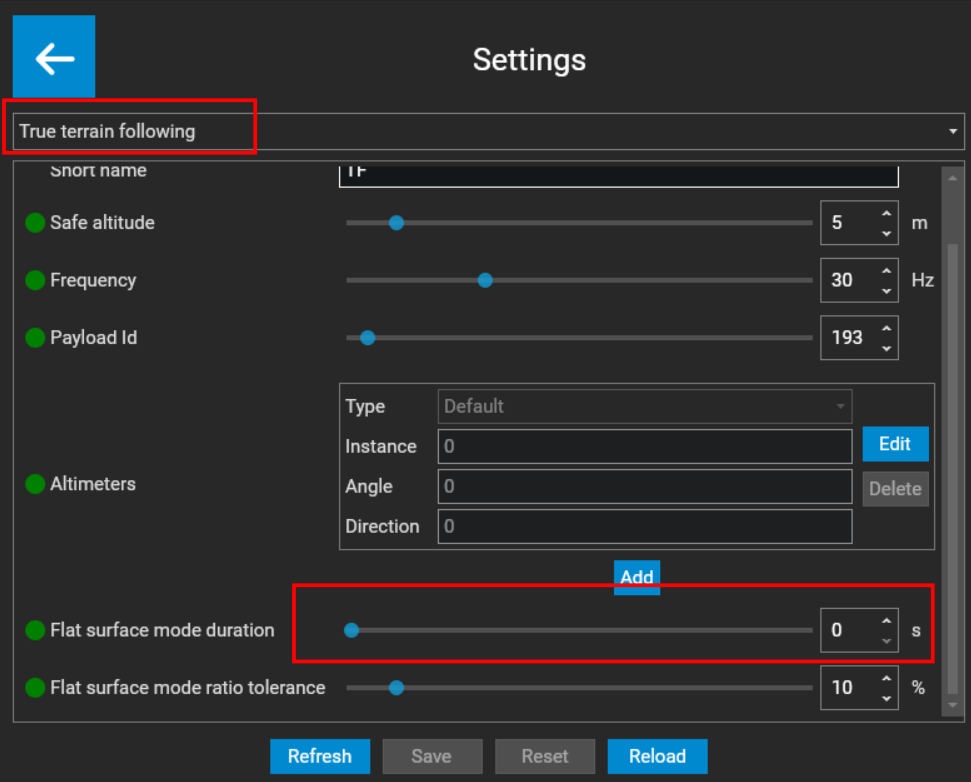
To turn Flat-Surface Flight Mode on, navigate to All Settings -> True Terrain Following. Scroll down and set Flat surface mode durationto a value above 0.
Note
Setting it to 0 turns the mode off.
Parameters
| Parameter | Unit | Default | Range | Description |
|---|---|---|---|---|
| Flat surface mode duration | s | 0 | 0–60 | Max time without valid readings, counted from the last valid one. 0 = FSFM off. |
| Flat surface mode ratio tolerance | % | 10 | 0–100 | Allowed difference between altimeter change and fused altitude change. 0 = anomaly check off (not recommended over water). |