3. Obstacle Avoidance#
The Obstacle Avoidance feature provides automated safety protection during drone operations by detecting and responding to obstacles in the flight path. This system continuously monitors the drone’s surroundings and automatically executes configured safety actions when obstacles are detected within specified distances.
The Obstacle Avoidance system uses multiple sensor types to detect obstacles around your drone. When an obstacle is detected within your configured safety distance, the system automatically executes your chosen safety action (hover, return home, or do nothing).
Note
DJI drones have built-in obstacle avoidance sensors. Additionally, it is possible to attach a standalone radar sensor or an additional altimeter to both DJI and MAVLink-controlled drones.
If you want to use both DJI and SkyHub obstacle avoidance at the same time, make sure the Brake distance value in DJI Pilot 2 is smaller than the Safety distance limit in SkyHub Obstacle Avoidance. Otherwise, the two algorithms can interfere with each other and lead to unpredictable behaviour.
There are two main obstacle avoidance setup use cases:
Perform the flight only with the built-in DJI obstacle avoidance sensors.
Perform the flight with built-in DJI obstacle avoidance sensors paired with an external radar or altimeter.
Warning
In both scenarios, DJI built-in downward obstacle avoidance sensors must be disabled if the drone is carrying a payload beneath. Otherwise, the downward sensor will detect the payload as an obstacle, and the failsafe will be triggered.
External sensors are necessary to add an additional layer of security in conditions when built-in DJI sensors will fail: dark, snow, rain, fog, bright sun.
Note
Do not forget to check if 77 GHz range sensors are permitted for use in your particular country.
3.1. Setup process#
Power on the system.
Establish either the drone link or auxiliary connection with the SkyHub in the UgCS-CPM software.
On the main screen of the UgCS-CPM, click on the “Settings” button.
From the drop-down list, select “Obstacle avoidance”.
Select the safety action.
Select the activation altitude.
Select the activation speed.
Select the altitude source (source to measure if the drone has reached the activation altitude you set previously).
Select the minimal safety distance threshold (minimal distance to the obstacle to detect. Values below this limit will be ignored).
Select the safety distance limit (distance at which the failsafe will be triggered).
(optional) Select the altimeter safety source (if your setup contains multiple altimeters and you wish to use one of them as a proximity source).
(optional) Select the radar safety source (if your setup contains an external radar MR72).
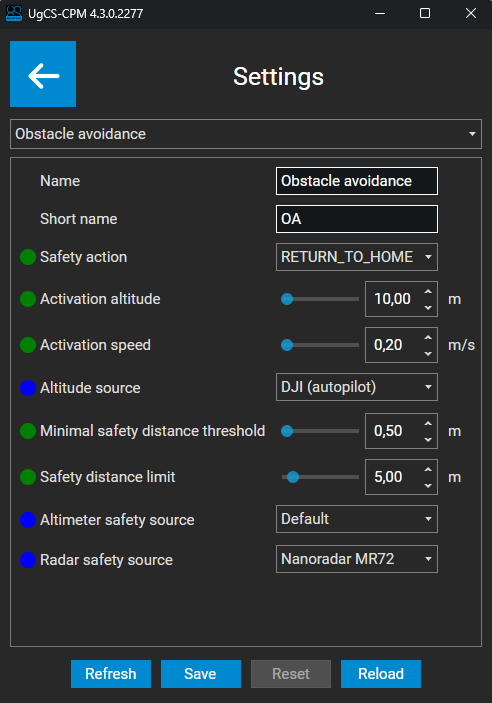
UgCS-CPM, Obstacle avoidance settings#
When the drone is on the ground or hovering in the air, the obstacle avoidance system is in idle state. For obstacle avoidance to be armed and active, the drone must reach a certain altitude and speed, or the TTF/GH mission under SkyHub control must be activated.
Those values can be set in the “Settings” within the UgCS-CPM.
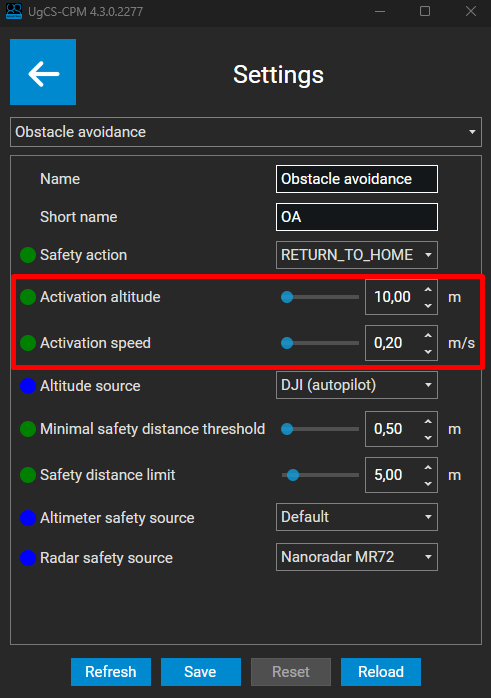
UgCS-CPM, Obstacle avoidance activation values#
Note
If no SkyHub mission is running, obstacle avoidance will be active only when both the activation altitude and activation speed are reached simultaneously. Otherwise, the system will be in idle state.
3.2. Safety actions#
The safety action will determine the drone’s behavior in case of close proximity to an object.
Here is the list of available actions you can choose from:
Action |
Description |
|---|---|
|
Stop mission and initiate automatic return to home. |
|
Stop mission and maintain current position. |
|
Display warning message, continue mission. |
|
No action will be taken, monitoring only. |
3.3. Altitude sources#
Within the Altitude source, you can select the elevation source that will be used to check whether your drone has reached the activation altitude.
There are multiple altitude sources you can choose from:
Altitude source |
Description |
|---|---|
|
Use your default altimeter to measure activation altitude. |
|
Use the DJI built-in barometric readings to measure activation altitude. |
|
Use the Mavlink built-in barometric readings to measure activation altitude. |
|
Use a custom source of elevation. |
Note
It is also possible to select the exact altimeter model from the list. This is designed for the flight cases if there are multiple altimeters mounted on the drone.
If your setup contains only one altimeter, choose between the “Default” or “Autopilot” values.
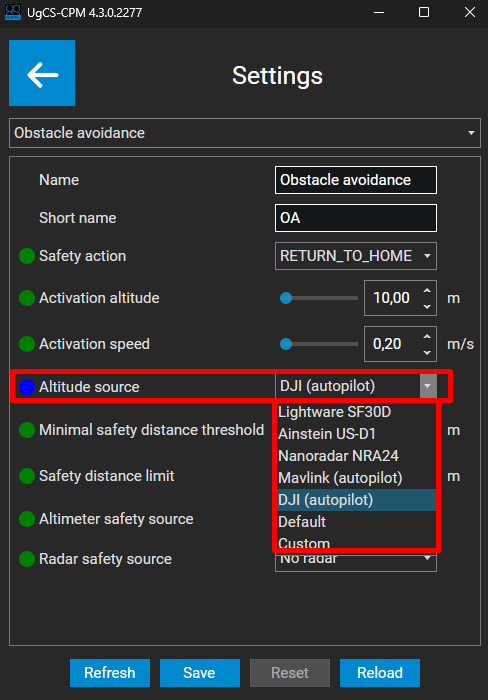
UgCS-CPM, Obstacle avoidance altitude sources#
3.4. Safety sources#
Within the safety sources, you can select the source you wish to use to measure the distance to an object (proximity).
There are three safety sources you can modify:
Altimeter safety source - if your setup contains multiple altimeters and you want to use one of them to measure the distance to an object.
Radar safety source - if your setup contains an external MR72 radar and you wish to use it to measure the distance to an object.
Embedded DJI sensors – cannot be configured with UgCS-CPM. Instead, SkyHub will use sensors which are enabled with the DJI Pilot 2 application.
Note
Embedded DJI obstacle avoidance (OA) sensors continue to work in parallel with the selected safety source, unless they are turned off in the Obstacle Avoidance settings.
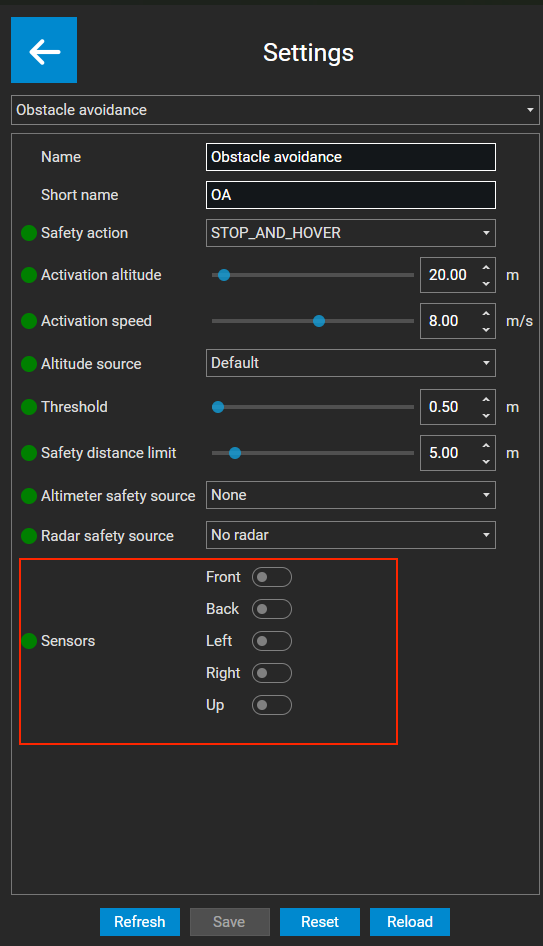
Obstacle Avoidance sensor toggles#
Warning
Do not modify Altimeter safety source if your setup contains only one altimeter. This field is designed only if your drone has multiple altimeters mounted at the same time.
3.4.1. Use case examples#
If your setup contains only one altimeter (for the altitude measurement) and no external MR72 radar, your setup should be the following:
Altimeter safety source - None
Radar safety source - No radar
In this case, safety distance will be calculated from the built-in front DJI obstacle avoidance sensor.

UgCS-CPM, setup with no external radar#
If your setup contains only one altimeter (for the altitude measurement) and you have an external MR72 radar, your setup should be the following:
Altimeter safety source - None
Radar safety source - Nanoradar MR72
In this case, safety distance will be calculated from the external Nanoradar MR72 mounted on the drone.

UgCS-CPM, setup with external radar#
3.5. Configuration Parameters Summary#
Parameter |
Default |
Min |
Max |
Precision |
Unit |
Options |
Description |
|---|---|---|---|---|---|---|---|
Safety action |
STOP_AND_HOVER |
RETURN_TO_HOME, STOP_AND_HOVER, WARNING, NOTHING |
Drone action flying to close to obstacle |
||||
Activation altitude |
20.0 |
0.0 |
500.0 |
0.01 |
m |
Obstacle Avoidance activation altitude |
|
Activation speed |
8.0 |
0.0 |
15.0 |
0.01 |
m/s |
Obstacle Avoidance activation speed |
|
Altitude source |
Default |
Lightware SF30D, Ainstein US-D1, Nanoradar NRA24, DJI (autopilot), Default |
Altitude source that will be used for obstacle avoidance activation |
||||
Threshold |
0.5 |
0.0 |
50.0 |
0.01 |
m |
Minimal distance to obstacle to detect. Values below this limit will be ignored |
|
Safety distance limit |
5.0 |
0.0 |
50.0 |
0.01 |
m |
Safety distance at which failsafe is triggered |
|
Altimeter safety source |
None |
None, Lightware SF30D, Ainstein US-D1, Nanoradar NRA24, Default |
Safety distance sources |
||||
Radar safety source |
No radar |
Nanoradar MR72, No radar |
Safety distance sources |
||||
Sensors |
FRONT BACK LEFT RIGHT UP |
Front, Back, Left, Right, Up |
Internal drone obstacle avoidance sensors to use |