1. About Log Files#
Logs are stored in the skyhub_logs folder on the microSD card.
There are two types of obligatory log files:
Position log:
*-position.csvSystem log:
*-system.log
Position logs (-position.csv suffix) contain drone position data (GPS coordinates, attitude, altitude, etc.) followed by the payload’s specific parameters, if any.
For more details, see Position Log.
System logs (``-system.log`` extension) are a journal of various system events. Please keep them when contacting our support team.
Also, depending on the specific payload used, you may get the following log files, for example:
GPR data log in SEG-Y format:
*-gpr.sgyEchosounder data log in SEG-Y format:
*-echo.sgyEchosounder data log in NMEA format:
*-nmea.txtGas detector data log in NMEA format:
*-pergam-*.log
GPR data logs (-gpr.sgy suffix) contain radar trace data in SEG-Y format. These files can be analyzed in PC applications such as Prism2 or similar software capable of reading and processing GPR data in SEG-Y format.
Echosounder data logs in SEG-Y format (-echo.sgy suffix) contain sounding trace data. These files can also be analyzed in the SEG-Y data processing software.
Echosounder data logs in NMEA 0183 format (-nmea.txt suffix) contain bathymetric data. These files can be processed in any software capable of handling data in NMEA 0183 format (e.g., ReefMaster).
Gas detector data logs in mixed NMEA 0183 + raw messages format (-pergam.txt suffix) contain measured concentration data.
The filename contains sequential numbers (000001, 000002, etc.) before time synchronization and date/time (in YEAR-MONTH-DAY-HOUR-MIN-SEC format) after synchronization with GPS. The time is UTC.
Logging (except system log) is started only by command from UgCS-CPM (using the Record/Stop button) or automatically after taking off. The system log begins after onboard software is started.
Logs with the same file names have been created simultaneously. When the filename is to be changed (e.g., after time synchronization), a new set of logs is created.
The logs can be automatically divided by file size, time, trace count (GPR or echosounder only), and waypoints. This option is turned off by default. To enable it, set the corresponding parameters to values greater than zero in the [APP] section. More than one parameter can be set simultaneously. In this case, splitting will be fulfilled when the first of the selected conditions occurs:
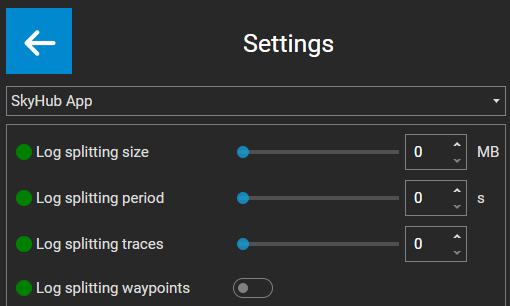
UgCS-CPM Logging Settings#
When LOG_SPLIT_WAYPOINTS is set to 1 or another value greater than zero, each log file will contain one flight line with two waypoints.
For how to download log files using UgCS-CPM, see section Log Files Management.